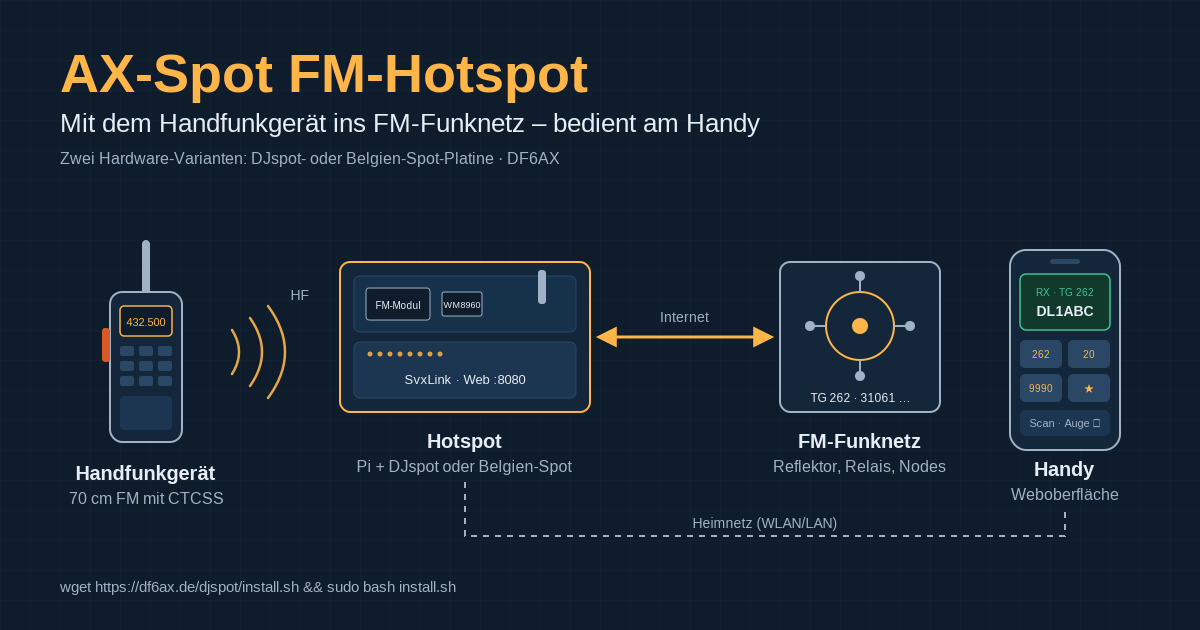
In the FM-Funknetz, repeaters and hotspots all over Germany and beyond are linked via talkgroups (TGs). With the AX-Spot you join in with your own handheld: you talk into your radio on a local frequency, the hotspot passes the signal into the network, and whatever is said on the network it transmits back on your frequency.
The AX-Spot is a Raspberry Pi with a radio board plugged on top. It runs SvxLink as the link to the reflector, plus its own web interface where you set the talkgroup, frequency, CTCSS tone and everything else.
Two hardware variants, one software
You can build the AX-Spot with either of two radio boards. Both work equally well: the installer, the web interface and all features are the same. You tell the installer once which board you have, and it takes care of the rest.
DJspot board
With the NiceRF SR-FRS-0W5V radio module (0.5 W). Developed and tested on the Raspberry Pi 3B+.
In the installer: 1 – DJspot
Belgium-Spot board
With the NiceRF SA818S radio module. Tested on the Raspberry Pi Zero 2 W with a 32-bit system, Wi-Fi only.
In the installer: 2 – Belgien-Spot
The boards differ only in how the radio module is wired to the Pi and how it is addressed. The details for tinkerers:
| Variant 1: DJspot | Variant 2: Belgium-Spot | |
|---|---|---|
| Radio module | NiceRF SR-FRS-0W5V | NiceRF SA818S |
| PTT | GPIO13, active high | GPIO16, active low |
| Squelch | GPIO26, active high | GPIO12, active low |
| CTCSS command | index | four digits |
| Audio | WM8960 | WM8960 |
Radio, hotspot and network
Both boards carry a small 70 cm FM module and an audio codec. The Pi programs the module over the serial port, keys the PTT and uses the squelch to detect when you are transmitting. When the squelch opens with the correct CTCSS tone, your transmission goes via SvxLink to the FM-Funknetz reflector.
In the other direction, the hotspot plays the audio from the network out through the module. When you change talkgroup, it announces the new TG over the air, for example “Sprechgruppe zwo sechs zwo” (talkgroup two six two, in German). That way you know where you are even without your phone.
What you need
- One of the two radio boards, DJspot or Belgium-Spot, with a 70 cm antenna.
- A Raspberry Pi with a soldered 40-pin header, such as a Pi 3B+, Pi 4 or Pi Zero 2 W/WH, plus a 2.5 A power supply and a microSD card of 16 GB or more with a fresh Raspberry Pi OS.
- Access to the FM-Funknetz: a registered callsign with a suffix for the hotspot and the reflector password (auth key), obtained via a ticket at ticket.fm-funknetz.de.
- A 70 cm FM handheld that can transmit a CTCSS tone.
Transmitting via the FM-Funknetz is only permitted with a valid amateur radio licence and your own access.
Installation with two commands
Write Raspberry Pi OS to the card with Raspberry Pi Imager, setting up the user, Wi-Fi and SSH as you go. After the first boot, log in via SSH and run the following, whichever board you have:
wget https://df6ax.de/djspot/install.sh
sudo bash install.sh
The installer first asks which radio board is fitted, then for the callsign and the auth key. It then sets up audio, the serial port and the matching GPIO pins, and installs SvxLink, the web interface and the German voice announcements. A reboot is needed at the end. You can then reach the interface at http://<IP-of-the-Pi>:8080/.
Installation step by step
Select Raspberry Pi OS in Raspberry Pi Imager. In the settings, enter the hostname, user, password and Wi-Fi, and enable SSH. Fit the radio board (DJspot or Belgium-Spot), connect the antenna, insert the card and boot the Pi.
Log in via SSH and run wget https://df6ax.de/djspot/install.sh and sudo bash install.sh. Choose the board: 1 for DJspot, 2 for Belgium-Spot. Then enter the callsign exactly as registered, followed by the auth key. Confirm the reboot at the end.
Open http://<IP-of-the-Pi>:8080/ in the browser. Under the gear icon, set the frequency and CTCSS tone, and under “Station / location” enter your QTH locator. Then pick a talkgroup on the main page.
Set the handheld to the hotspot frequency and set the transmit tone (TX CTCSS) to the same value as in the hotspot. Without the matching tone the squelch will not open. For the first test, use TG 9990 (echo test).
No Wi-Fi? The hotspot helps itself
If the AX-Spot finds no known Wi-Fi and no LAN when it starts, it opens its own Wi-Fi network called DJspot-Setup after a short wait (password 12345678). Connect to it, open http://10.42.0.1:8080/ and choose the Wi-Fi network it should join. It remembers up to four networks with their passwords, for example at home, in the garden and your phone’s hotspot on the go. On the Pi Zero 2 W, which only has Wi-Fi, this is how you do the initial setup when you are out and about.
What operating it looks like

The talkgroup you are currently active on is shown large in the middle. When someone is talking, the display turns green and shows callsign, name, location and distance; when you transmit yourself, it turns red. Favourites sit below as large tiles, and one tap switches over. If someone is talking on a favourite TG, its tile lights up orange and shows their callsign, even while you are listening elsewhere. You can type in any other TG freely. The eye icon shows which stations are currently on your TG, with their location and distance from you.
You can also select the talkgroup directly from the radio via DTMF: press PTT, wait briefly, key 91262#, release, and the hotspot switches to TG 262. 91# jumps back to the previous TG.
Favourites from the official talkgroup list

Which talkgroups are there in the first place? The FM-Funknetz talkgroups button below the favourites opens the official list of the FM-Funknetz with number and name. The search field quickly finds “Bayern”, “Hamburg” or your region. Whatever you tick becomes a favourite and then appears as a tile on the main page; untick it and the tile disappears. Your own names and the order of your existing favourites are kept.
Scan mode

Where is someone talking right now? The AX-Spot knows, because the FM-Funknetz reports every speaker on every TG. In scan mode it jumps right there. One tap on the main page decides whether it only works through your monitor TGs or covers all TGs on the network. The SSTV groups with their image transmissions are always skipped, and you can exclude further TGs yourself.
It works like the timed scan on a radio: it stays on a TG for 20 seconds, then moves on to the next one where someone is talking. Always upwards by TG number, starting again from the bottom after the highest. If nothing is going on anywhere else, it stays put. Want to join in? Just press PTT. What happens next is up to you: either PTT stops scanning and keeps you on this TG until you switch scanning back on from the main page. Or scanning takes a QSO pause. The hotspot then stays while you transmit or someone talks there, and for an adjustable time afterwards (default 60 seconds). Once the QSO is over, it resumes scanning by itself.
Station, APRS and roger beep
Under “Station / location” you enter your name, location and QTH locator. These details are sent to the FM-Funknetz, so other users see you with location and distance. If you like, the hotspot also reports its position as an APRS beacon to APRS-IS.
After your transmission the hotspot can send a roger beep, either a simple beep or a Morse K. That tells you it has received you. If you don’t like it, switch it off in the settings. The change takes effect immediately, without the hotspot logging in to the network again.
Changing settings without disturbing the network
Every SvxLink restart briefly logs the hotspot out of the reflector and back in, and the whole FM-Funknetz sees that. The AX-Spot therefore only restarts SvxLink if something has actually changed when you save. If you press “save” without a change, nothing happens on the network. The message after saving tells you whether a restart took place.
For tinkerers there are two switches under Expert for pre- and de-emphasis, i.e. the treble boost on transmit and the cut on receive. The radio modules on both boards already do this themselves, so both switches are normally off. Switching them on is only worthwhile with a module that delivers flat, unequalised audio.
Updates
The AX-Spot checks with df6ax.de at startup and once a day thereafter whether a new version is available. Nothing is installed automatically. If an update is available, the web interface shows it, and one press of a button installs it. The package is verified by checksum; the board selection, callsign, auth key, talkgroup, favourites and location are kept. During the check the hotspot transmits the software version, an anonymous device ID and the callsign.
Frequently asked questions
Which board do I have?
If the board says DJspot and has an SR-FRS module on it, it is variant 1. With an SA818S module it is usually the Belgium-Spot, i.e. variant 2. If you picked the wrong one during installation, you can change it at any time: sudo DJSPOT_BOARD=belgien bash install.sh or DJSPOT_BOARD=djspot.
Can the Belgium-Spot variant do less than the DJspot variant?
No. Both variants use the same software with all features: web interface, talkgroup list, eye icon, scan, DTMF, TG announcements, roger beep, expert settings, APRS and updates.
I can hear the hotspot, but it doesn’t hear me. Why?
Almost always it’s the CTCSS tone. Your radio must transmit the same CTCSS tone that is set in the hotspot under “FM / radio module”. On many radios the transmit tone is set separately from the receive tone.
I hear a short burst of noise after every transmission. Is the hotspot faulty?
No, that is the squelch tail of your handheld: when the hotspot drops its carrier, your radio stays open for a moment. Switch on tone squelch (CTCSS receive) on your radio.
Received audio sounds dull or my transmission sounds harsh. What can I do?
Check under “Expert” whether de-emphasis or pre-emphasis is switched on. On the AX-Spot both normally belong off, because the radio module already equalises the audio itself. Applied twice, it sounds dull or harsh.
Where do I get the auth key?
Via a ticket at ticket.fm-funknetz.de. The callsign must be entered exactly as registered there, including the suffix and upper and lower case.
Why are the download path and the Wi-Fi still called “djspot”?
The AX-Spot was originally called “DJspot FM-Hotspot”. The download address, service names and the setup Wi-Fi keep the old name so that hotspots already installed continue to receive updates.
How do I remove the hotspot software?
With sudo bash install.sh --uninstall. This removes the web interface, scripts and services. SvxLink, the configuration and the system packages are kept.
The bottom line
With a Raspberry Pi, one of the two radio boards and two commands, you are QRV in the FM-Funknetz with your handheld. Whether DJspot or Belgium-Spot makes no difference to operation. The things that need the most care are the callsign, which must be entered exactly as registered, and the matching CTCSS tone on your radio.
The download is at df6ax.de/djspot, and you install it with the commands above. The complete manual is available as a web page and as a PDF.