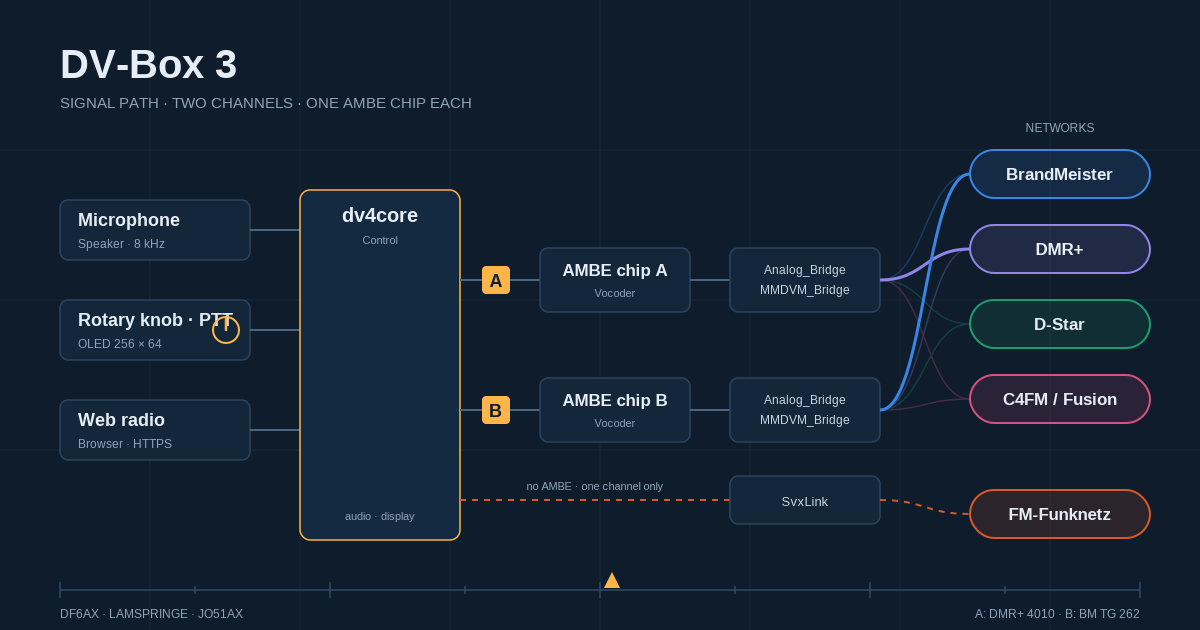
If you do digital voice over the internet in the shack, you will know the situation: a hotspot sits on one network, the radio on one talkgroup, and if you want to listen to another reflector in between, you first wait for the connection to be set up. The DV-Box takes a different approach. Microphone, speaker, display and control knob are built in, so it does not need a radio. And it has two channels, both permanently connected to their network.
Two channels, both always connected
The box works with channels A and B. Each channel has its own voice codec, i.e. its own AMBE chip, and can be configured independently. Channel A can sit on a DMR+ reflector, channel B on a BrandMeister talkgroup. You listen and transmit on the active channel. A short press on the rotary knob switches to the other channel – instantly, because its connection is already up.
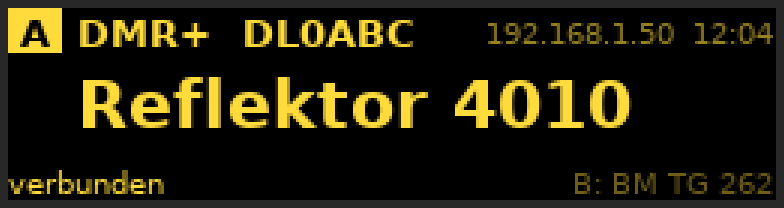
What is happening on the other channel is shown in the bottom right of the display. The user manual gives an example: channel A is on DMR+ reflector 4010 (Lower Saxony), channel B on BrandMeister TG 262. You are listening to 4010. As soon as someone talks on TG 262, “B: … ● Aktiv” (active) appears, and a press on the knob brings channel B to the speaker.
DV-Box 3 is the control software for this. It runs exclusively on the former DV4Home 2, where it replaces the factory software. The device has an NXP i.MX6 processor, an OLED display with 256 × 64 pixels, a built-in microphone and speaker and an Ethernet port. Audio runs at 8 kHz, 16 bit, mono.
On the unit: display, rotary knob and PTT
To operate the unit itself, a rotary knob with push button and the PTT key are all you need. Turning sets the volume in steps of 2 %. A short press switches between A and B; in standby it switches the unit on. Holding the knob for 1.5 seconds puts it into standby. If you hold it down while turning, the quick select scrolls through the favourites of the active channel. Releasing it takes over the entry shown.
“Short” means less than 0.8 seconds. Between 0.8 and 1.5 seconds nothing happens on purpose, so that you do not trigger anything by accident. Shutting down only works from standby, with a new press of 5 seconds and a countdown on the display. Letting go during the countdown cancels it.
The box transmits for as long as the PTT is pressed, always on the active channel. The display then shows “TX”, the target and a level bar. Switching channels is blocked while transmitting. After the configured maximum time, 180 seconds by default, the transmission ends automatically.
When receiving, the callsign is shown in large type, below it name and location from the DMR ID database, and at the bottom DMR ID, timeslot, target and the duration of the transmission. After the transmission the station stays on screen, dimmed, for another 10 seconds, so you can read even a short over.
One transmission step by step
Channel A is active and connected to DMR+ reflector 4010. The second channel is shown bottom right, here BrandMeister TG 262. If someone talks there, “● Aktiv” (active) appears, and a short press on the knob brings channel B to the speaker.
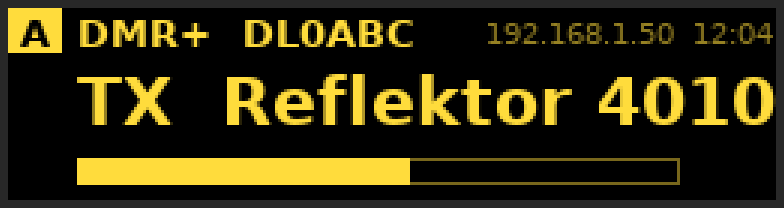
Press PTT and speak into the microphone from a distance of 10 to 20 cm. The display shows “TX”, the target and the level. You always transmit on the active channel.
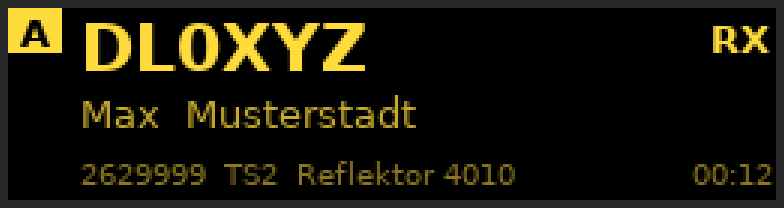
The other station replies. With DMR, callsign, name and location come from the DMR ID database; timeslot, target and duration are shown at the bottom. The transmission is also added to the call list “Zuletzt gehört” (last heard).
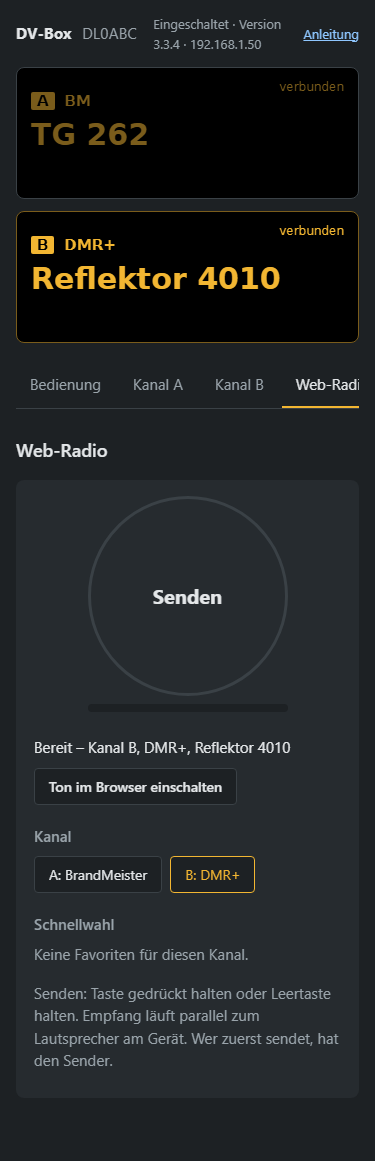
The same transmission also works from a smartphone. In the web radio, tap “Ton im Browser einschalten” (enable audio in the browser) and hold down the large round button to transmit. Whoever transmits first has the transmitter; the PTT on the unit is blocked for that time.
In the browser: web interface and web radio
You open the web interface in the browser of a computer, tablet or smartphone on the same network, at the address shown in the top right of the display. The box encrypts the connection with a self-signed certificate. The browser therefore shows a warning the first time, which is normal for home network devices. The encrypted connection is also what allows the browser to grant microphone access in the web radio. When you log in for the first time, you set your own password; no settings are possible before that.
At the top, the two channels are shown as tiles in the style of the display. Clicking the other tile switches over, just like pressing the knob on the unit. Below are the sections Bedienung (operation), Kanal A, Kanal B, Web-Radio, Station and System, plus FM-Chat when using the FM-Funknetz.
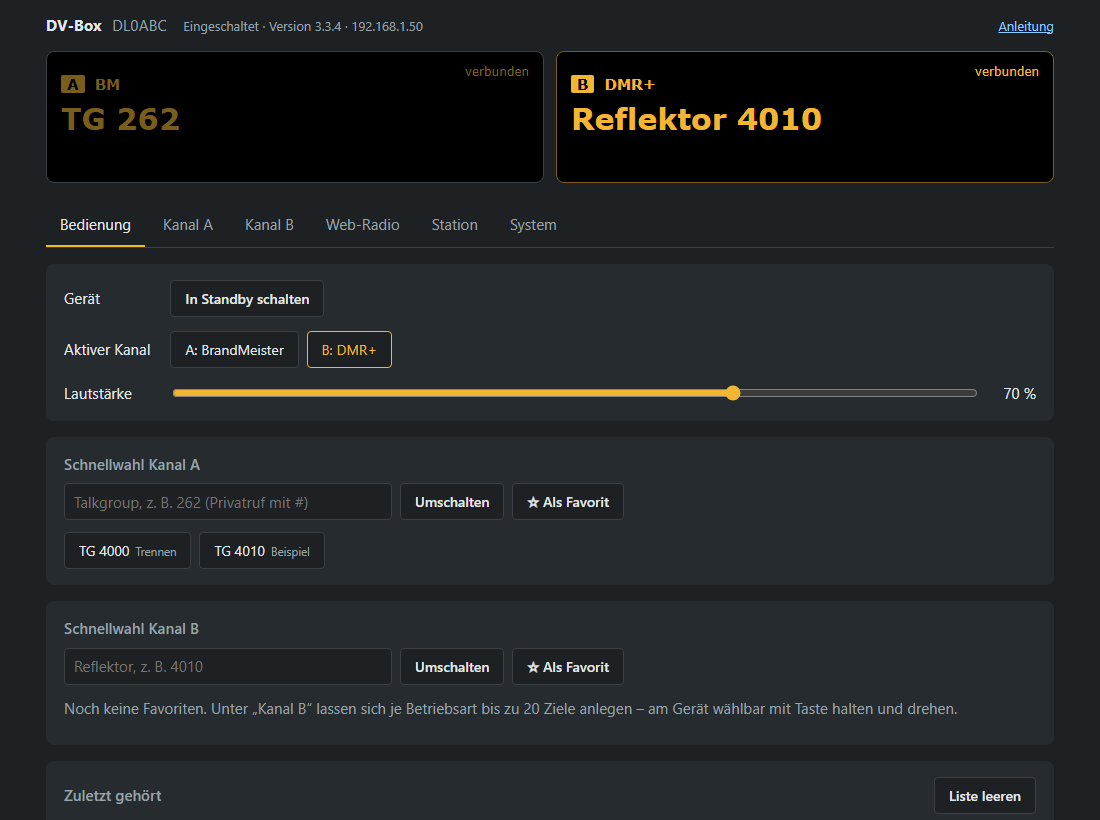
In each channel’s quick select you type a target or pick it from the suggestion list; “Umschalten” (switch) changes over immediately. “☆ Als Favorit” (add as favourite) saves the target to the favourites of the current mode. Up to 20 favourites are possible per channel and mode. They are available in three places: on the rotary knob, in the Bedienung section and in the web radio.
At the bottom of the Bedienung section is the call list “Zuletzt gehört” (last heard) with the last 50 transmissions on both channels: time, channel, callsign, name and location, target and duration. Your own transmissions are shown in red.
With the web radio you listen and transmit directly in the browser, from a smartphone too. After “Ton im Browser einschalten” you hear the active channel in the browser, in parallel with the box’s speaker. To transmit, hold down the round button or the space bar. You select channel and favourites next to it, and the unit switches along.
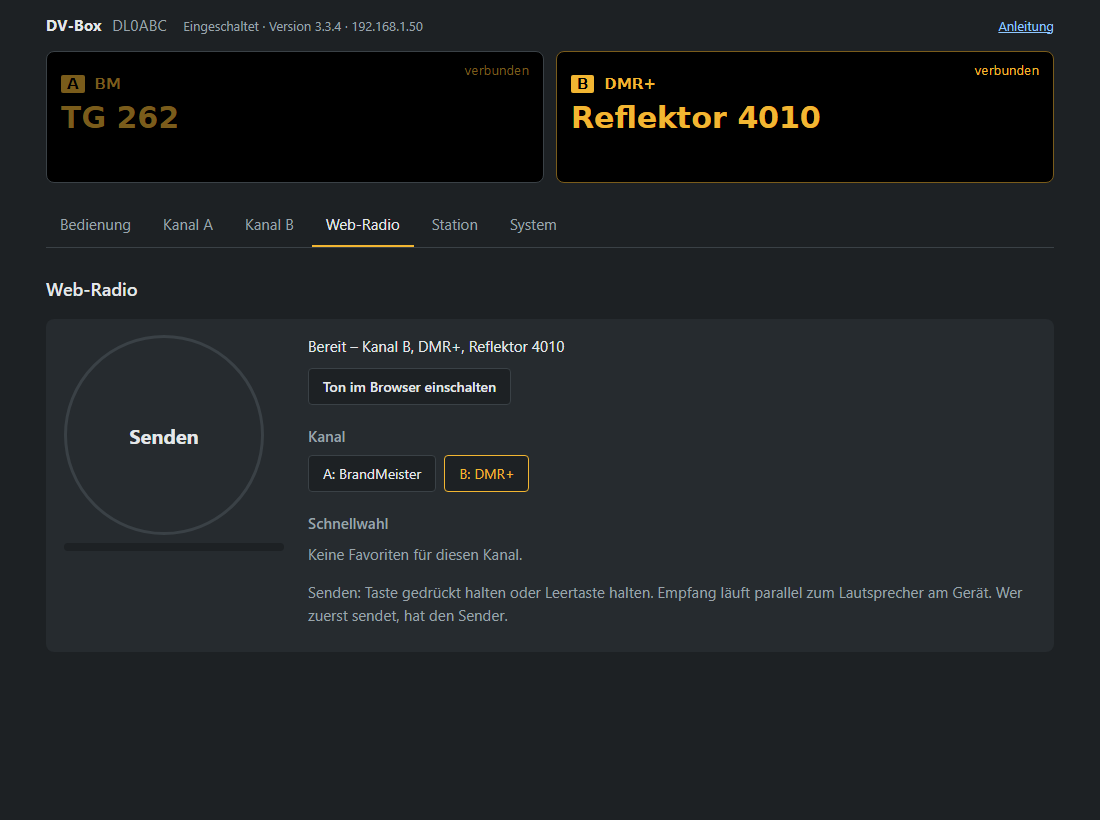
Only one place can transmit at a time. Whoever presses the transmit button first, on the unit or in the browser, has the transmitter; the other side sees “Sender belegt” (transmitter busy). If you leave the browser tab or the connection drops, transmitting stops immediately. The web radio needs about 130 kbit/s in each direction and runs in Chrome, Edge, Firefox and Safari.
The networks: BrandMeister, DMR+, D-Star, C4FM and FM-Funknetz
Each channel can be set to one of five modes. “Speichern und übernehmen” (save and apply) reconnects only the channel that was changed; the other one carries on undisturbed.
- DMR BrandMeister: the target is a talkgroup; a private call is marked with
#.9990#reaches the echo. If an API key is entered, the box automatically adds the selected talkgroup as a static TG; otherwise BrandMeister drops a dynamic TG after about 15 minutes without your own transmissions. If both channels are on BrandMeister, channel B needs its own 9-digit hotspot ID. - DMR+: the target is a reflector from 4000 to 4999; 4000 disconnects. You always talk on TG 9, and the reflector determines whom you reach. With DMR+, switching via quick select triggers a short transmission, as that is how switching works there.
- D-Star: reflectors of type DCS, XLX, REF and XRF with module. If both channels are on D-Star, each needs a different module of its own. For REF reflectors your callsign must be registered with D-Star; without registration you can only listen. After switching on it takes about a minute, because the gateway first loads the reflector lists.
- C4FM / Fusion: YSF reflector with a five-digit number or FCS room, voice mode DN or VW.
- FM-Funknetz: the analogue voice network with talkgroups. The box logs in there like a radio node. You apply for the access key for your own callsign at ticket.fm-funknetz.de. FM-Funknetz runs on only one of the two channels. Up to 10 monitor TGs can be followed, and talkgroups that are not enabled for your callsign are marked by the box with ⊘.
Technically, each channel runs via a pair of MMDVM_Bridge and Analog_Bridge to its AMBE chip. D-Star uses a shared ircDDBGateway for both channels, Fusion one YSFGateway per channel. The FM-Funknetz does not need an AMBE chip; here SvxLink takes the place of the bridges. Everything is controlled by a Python process, dv4core; the web interface runs on nginx and PHP.
Updates arrive automatically via df6ax.de
Every time it starts, the DV-Box checks df6ax.de for a new version. If there is one, it is downloaded, checked for integrity with an SHA256 checksum and installed. Before every installation the box backs up its previous software, and the settings are kept. In the System section you can also check yourself with “Nach Update suchen” (check for update).
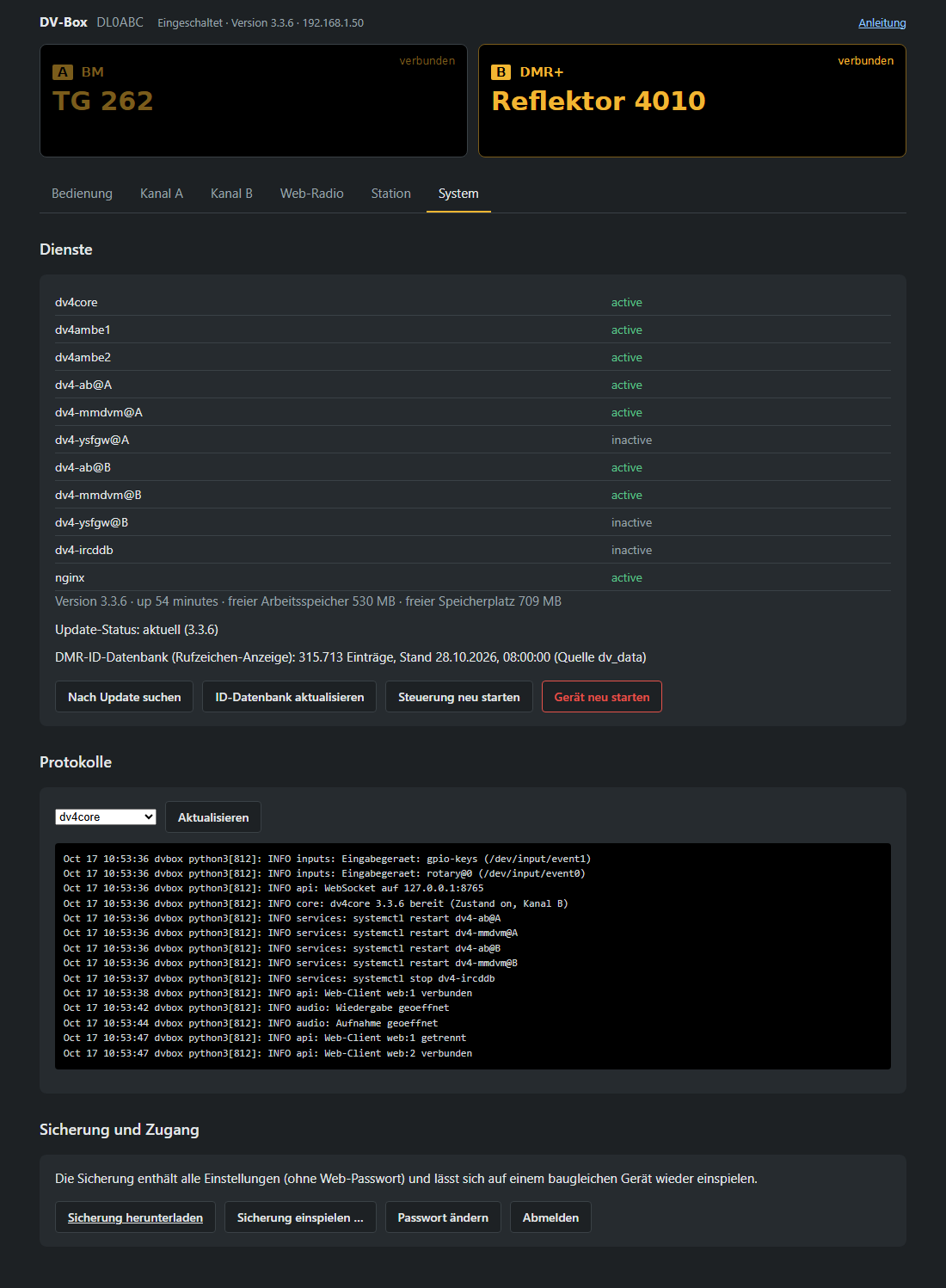
During the update check the box sends df6ax.de the software version, an anonymous device ID and, unless switched off under Station, the callsign. This is only used to get an overview of how many boxes are running which version. Under System you can also save all settings to a file, without the web password, and restore them on an identical box.
The first installation on a DV4Home 2 with factory software is done once via SSH and takes about 15 minutes. The installation package is neutral and contains no data from other stations. The factory software is not deleted, only switched off, and can be reactivated. Important: the software is only for the DV4Home 2. On a DV4Home 1 or 3 the device becomes unusable, which is why the installation script aborts there without making any changes.
Frequently asked questions
Do I need a radio or a hotspot for it?
No. Microphone, speaker, display and control knob are built in, and the box connects directly to the networks over the internet. In addition, you can listen and transmit in the browser via the web radio.
Can I listen to both channels at the same time?
Both channels are permanently connected, but you listen and transmit on the active channel. If there is activity on the other channel, the display shows “● Aktiv” (active) in the bottom right, and a short press on the knob switches over instantly.
Can I set both channels to the same network?
With BrandMeister and DMR+ yes; channel B then needs its own 9-digit hotspot ID. With D-Star each channel needs a different module of its own. The FM-Funknetz runs on only one of the two channels.
Why does the browser show a warning the first time?
The box encrypts the connection with a self-signed certificate. You confirm the warning once. The HTTPS connection is needed so that the browser grants microphone access in the web radio.
What hardware does the software run on?
Only on the former DV4Home 2. The installation guide describes converting a DV4Home 2 with factory software. It must not be installed on a DV4Home 1 or 3; these devices have different hardware and will be rendered unusable.
What happens to my settings during an update?
They are kept. The configuration is never overwritten by installations or updates, and the box backs up its previous software before every update.
What it all comes down to
DV-Box 3 turns a DV4Home 2 into a device with two channels that are both permanently connected. For example, you put one channel on the regional reflector and the other on a national talkgroup and switch with the press of a button, without any connection setup. On the unit, the rotary knob and PTT are all you need; in the browser you also get settings, the call list and the web radio. If you have a DV4Home 2, the two manuals contain everything you need for the conversion and for operation. Questions and feedback are welcome by email.